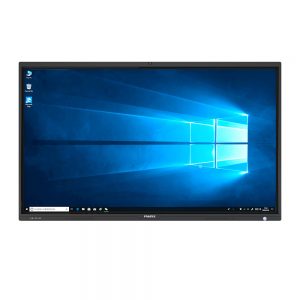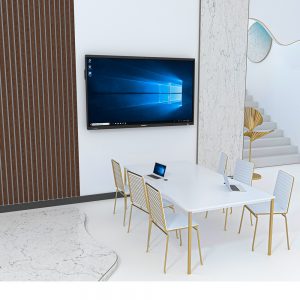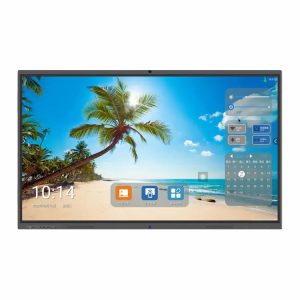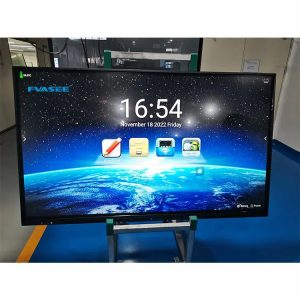
All-in-One 65 inch Interactive Touch Screen
The HS-EHY65 Interactive Touch Screen is a professional all-in-one smart display designed for meeting rooms, classrooms, and collaborative spaces.
It combines 4K visual performance, high-precision multi-touch, Android system, wireless screen sharing, and AI-powered whiteboard software in one integrated solution.
With optional OPS support, users can switch seamlessly between Android and Windows systems to meet different application needs.

Fvasee HS-EHY65 All-in-One 65 inch Interactive Touch Screen
Product Overview
The HS-EHY65 Interactive Touch Screen is a professional all-in-one smart display designed for meeting rooms, classrooms, and collaborative spaces.
It combines 4K visual performance, high-precision multi-touch, Android system, wireless screen sharing, and AI-powered whiteboard software in one integrated solution.
With optional OPS support, users can switch seamlessly between Android and Windows systems to meet different application needs.
Key Highlights
All-in-One Design
Display, touch, whiteboard, wireless sharing, and video conferencing in one device.Smooth Android Experience
Latest Android system ensures fast response and stable performance.Professional Interactive Whiteboard
Natural handwriting, multi-touch writing, gesture control, infinite canvas, and real-time annotation.Wireless Screen Sharing
Supports Android, iOS, Windows, and macOS devices with multi-screen display and touch-back control.Built-in Video Conferencing
Integrated 4K camera and array microphones for clear video and voice communication.OPS Dual-System Support
One-touch switching between Android and OPS PC for flexible usage.
Touch & Display Experience
High-precision infrared touch technology
Multi-touch writing and palm rejection
Ultra-clear 4K display with wide viewing angles
Anti-glare tempered glass for comfortable long-time use
Smart Software Features
Annotation on any content and application
Office file support (Word / Excel / PowerPoint / PDF)
Screen recording and content sharing
Split-screen writing and multi-task collaboration
AI-powered tools: handwriting recognition, speech-to-text, translation, and intelligent assistance
Connectivity & Expansion
Rich front and rear interfaces for external devices
High-speed wireless connection with Wi-Fi 6 and Bluetooth
OPS slot for easy system expansion
Designed for Multiple Scenarios
Corporate meetings & video conferences
Smart classrooms & training centers
Government and institutional applications
Collaborative workspaces
Optional & Customization
OPS PC configuration
OEM / ODM branding services
Customized software and interface
Main parameters
| Display parameters | |
| Model No. | HS-EHY65 |
| Screen size | 65 inch |
| Display Type | Direct LED (DLED) |
| Screen Resolution | 4K UHD 3840 x 2160 pixel |
| Brightness | ≥350cd/m |
| LED Lifespan | ≥60,000 hours |
| Panel Orientation &Aspect Ratio | 16:9 |
| Contrast Ratio | IPS: 1200:1, VA: 4000:1(Typ.) |
| Bonding technology | Zero Bonding |
| Refresh rate | 60Hz |
| View angle | 178° ( H) /178° ( V) |
| Display area | 1428.48 (H) x 803.52 (V) |
| Android system information | |
| System version | Android 14 |
| CPU | 8 cores(A55*8) |
| GPU | Mali-G52 MC2 |
| RAM | 8GB |
| ROM | 128 GB |
| System language | Support languages including English |
| Power supply | |
| Input voltage | 100-240V AC |
| Frequency Range | 50Hz/60Hz |
| Total power | ≤150W(not included the OPS PC power) |
| OPS power | DC : 19V/5A |
| Standby power | <0.5W |
| I/O Ports | |
| Front Interfaces | HDMI In x 1, USB-B For Touch x 1(Type-B 3.0)USB-A (Dynamic)3.0 x 2,USB-C x 1(Typical:USB2.0) |
| Rear Interfaces | HDMI In x 2, USB-A (Android2.0 x 1, USB-A (Android)3.0 x 1 TF-CARD x 1, RS232 x 1, HDMI Out x 1, 68 RJ45 In x 1 1000M, MIC IN x 1, Earphones x 1 USB-B For Touch x 1(Type-B 2.0) |
Others | |
| Camera | Built-in 48 MP camera ,8-array digital pickup microphone |
| Bluetooth | 5.4 |
| Wi-Fi | WIFI 6 802.11a/b/g/n/ac/ax, 2.4G\5G. |
| Internal Audio Speaker | 15W * 2 |
| Certification | ISO9001/CE/FCC/ ROHS/ Energy Star/WEEE/ CCC |
| Remote Control | Remote controller with operational functionality including system turned on and off. |
Environmental information | |
| Standard operating temperature | 0°C to 40°C |
| Standard working humidity | 20%~80% |
| Standard working altitude | 5000m |
| Standard storage temperature | – 10°C~60°C |
| Standard storage humidity | 20%~80% |
Appearance information | |
| Frame/back shell | Frame: Aluminum Profile/Black Brushed; Back Shell: Sheet Metal/Black |
| Tempered glass | 4mm thickness/anti-glare/Mohs 9H |
| VESA Hole | hole site 800mm*400mm |
| NW | 40±0.5KG |
| GW | 45±0.5KG |
| Package Size (carton box) | 166*26*116CM |
Touch parameter
Specifications | |
| Touch type | Infrared touch frame |
| Writing surface material | 4mm AG tempered glass with Anti-Glare coating. |
| Writing points | 40 points |
| Response time | <6.5ms |
| Touch accuracy | The accuracy of 90% central area is ±1mm, and the accuracy of 10% edge area is ±3mm |
| Hit counts | Unlimited |
| Notation | Fingers, special writing pens, or other non-metallic objects that are not sharp. |
| Report resolution | 32768*32768 |
| Light resistance | <80000Lux |
| System compatible | Windows7/10 and above;Android;Linux 、Mac |
| Palm erasure | Support |
| Plug and Play | Support |
| Drive mode | Free drive |
| Communication type | USB |
OPS specification
OPS slot specification | |
| Specification | Intel Core i5, 12th Generation PC with 16GB RAM, 512GB SSD, |
| Support power | ≤19V/5A |
| Pin protocol | 80-pin/Intel OPS standard protocol |
| Pin contains definition | Power supply, HDMI/DVI, USB, UART, OPS control, etc. |
| Max resolution | 3840*2160 |
| Max Refresh rate | 30/60Hz |
Accessories listing for each unit
| Power cable | 1 PCS |
| Remote control | 1 PCS |
| Markers (pens) | 2 PCS |
| HDMI cable | 1 PCS |
| Touch cable | 1 PCS |
| Wall stand ( wall mount kits) | 1 PCS |
| Wireless key board & mouse | 1 PCS |
Software Specifications
| Software Specifications | |||||||
| No | Feature | Description | Yes/ Remark | ||||
| Basic Functions | |||||||
| 1 | Interactive Interface Display | 1. Supports the display of clear icons and high-definition interfaces at a resolution of 3840*2160 (4K). 2. Adapts dynamically to screen resolutions of 4K-300%, 4K- 200%, 4K-150%, 1080P-150%, and 1080P-100%. or equivalent or above | yes
| ||||
| 2 | Mode | Support mode switching: Lesson Preparation Mode, Teaching Mode, Desktop Mode. or equivalent or above | yes | ||||
| 3 | Toolbar | Support the customization of the toolbar and save configurations for distinct accounts. Support the seamless switching of accounts for different toolbar functionalities. or equivalent or above | yes
| ||||
| Brush | 1. Support three types of strokes: pencil, pen, and highlighter. 2. The drawing pen allows color picking for swift color acquisition. 3. Enable automatic recognition of hand-drawn shapes: triangles, rectangles, circles, and straight lines. 4. Support embedding annotations into Word, PowerPoint, and Excel files, and saving annotation content to the source files of Word, PowerPoint, and Excel. 5. Support handwriting association. 6. Support generating a single stamp and drawing stamps consecutively. 7. Support a laser pointer, with the strokes automatically disappearing after a period of time. 8. Support using gestures to turn pages, delete elements, and open widgets. or equivalent or above |
| |||||
| 5 | Erase | 1. Provide various erasure methods, including pixel-point erasure, selection-based erasure, and sliding page cleaning. 2. Support full-palm erasure with Windows Ink. or equivalent or above |
yes
| ||||
| 6 | Fill | Support using the fill tool to fill flat shapes and any closed regions. or equivalent or above | yes
| ||||
| 7 | Graphics | 1. Support drawing various flat shapes and lines, such as triangles, polygons, and dashed lines. Flat shapes allow customization of border thickness, border color, and fill color. 2. Support drawing three-dimensional shapes, including cubes, 3. cylinders, and cones, with adjustable length, width, height, and 4. numerical display. 5. 3D shapes support unfolding into 2D shapes, filling different faces with different colors, and 3D rotation. Support 3D panoramic cube preview and opening with animation effects. or equivalent or above | yes
| ||||
| 8 | Smart Recognition | 1. Multi-touch gestures: Single-finger for selection and dragging; Two-finger for zooming and rotating; Support simultaneous gesture operations on selected objects and the entire page. 2. Handwriting recognition: Automatically recognize handwritten strokes as text; Recognized text supports secondary editing. 3. Pen-Finger Separation: Automatically distinguish between pen and finger on touchscreen devices, eliminating the need to switch to the pen tool in the toolbar. Recognize fine pen tips for writing and fingers for selection. 4. Support moving objects without the need for prior selection. or equivalent or above | yes | ||||
| 9 | Page Operations | 1. Support copy, delete, add, and remove pages. 2. Pages can be zoomed and infinitely scrolled, with a one-click return to the initial size. 3. Page ratios supported: 16:9, 16:10, 4:3 switching. or equivalent or above |
yes | ||||
| 10 | Background | 1. Page backgrounds support solid color, subject, and customized backgrounds. 2. Images can be set as page backgrounds using stretch, fit, or fill options. or equivalent or above | yes | ||||
| 11 | Import | 1. Support opening and editing iwb format files. 2. Support PPT and PDF format files. 3. Support directly dragging images and text from web pages onto the canvas. 4. Support inserting images, audio/video, and Office documents (Word/Excel/PPT) onto the canvas, with document support for page-turning operations. or equivalent or above | yes (Eqv.) | ||||
| 12 | Image Editing | 1. Support cropping inserted images and removing image backgrounds. 2. Support recognizing text within images and converting it into editable text. or equivalent or above | yes | ||||
| 13 | Object Properties | 1. Support modifying the layer order of objects. 2. Objects support setting hyperlinks, including: opening files, jumping to specific page numbers, opening specified URLs, hyperlink text, and opening small tools. 3. Support grouping multiple objects. 4. Support locking object positions. or equivalent or above | yes | ||||
| 14 | Cloud Storage | 1. The software supports simultaneous login to OneDrive, Google Drive, and Dropbox accounts, displaying the content from these accounts simultaneously. 2. Images, audio/video, and Office documents from OneDrive, Google Drive, and Dropbox accounts can be directly inserted into the canvas. 3. Support logging into OneDrive, Google Drive, and Dropbox from the software to open lesson files and directly save them to the cloud. or equivalent or above | yes | ||||
| 15 | Export | 1. Support scanning QR codes to easily capture page content. 2. Support printing page content. 3. Support exporting specific pages to generate image or PDF files. 4. Course materials created through the software can be saved in iwb format, with the additional capability of secondary editing for iwb format files. or equivalent or above | yes | ||||
| 16 | Language | Supports multiple languages, including English, Simplified Chinese, Ukrainian, Spanish, Portuguese, Russian, French, Romanian, Polish, Malay, Vietnamese, Bosnian, German, Azerbaijani, Arabic, Indonesian, Thai, Persian, Hungarian, Turkish, Mongolian or equivalent or above | yes | ||||
| 17 | Resource Library | Boasts over 10,000 educational resources. | |||||
| 18 | Object Animation | 1. Allow adding entrance, exit, and emphasis animations for single or multiple objects, including over ten types of effects such as fade-in, lines, and custom motion paths; support setting 2. animation duration. 3. Support previewing individual animations and all animations on the page. 4. Support editing the animation order on the page; support setting animation triggers: simultaneously with the previous animation, after the previous animation, or triggered by clicking the next page. 5. Support setting page-turning animations. or equivalent or above |
yes
| ||
| Tools | |||||
| 1 | Screen Capture | Support full-screen screenshot, regular screenshot, and irregular screenshot. or equivalent or above | yes | ||
| 2 | Video Control | Support inserting and playing audio/video files within the whiteboard. or equivalent or above | yes | ||
| 3 | Function | 1. Support generating six types of function graphs, including linear functions, quadratic functions, and power functions. 2. Support overlaying multiple function graphs on the same coordinate system. or equivalent or above | yes | ||
| 4 | Note | 1. Support editing text and note text properties, such as font color, font size, and formatting effects. 2. Text input method supports handwriting input. 3. The text input method supports voice input. or equivalent or above | yes | ||
| 5 | Tables, Charts and Mind Maps | 1. Supports custom rows and columns in tables, and entering text within cells. 2. Support generating corresponding pie charts and bar charts from input data. 3. Support creating mind maps, and adding, deleting, and editing branches of tree diagrams. or equivalent or above | yes
| ||
| 6 | Search | 1. Support Google search, Microsoft search. 2. Support keyword search and dragging text and images from search results onto the canvas. 3. Supports handwriting search. | yes | ||
| 7 | Split Screen Writing | 1. Support dividing the screen into 2-4 writing areas, each with independent writing without interference. 2. Writing areas have separate toolbars, supporting pen color switching, erasing strokes, and clearing. 3. Support one-click sending content to each writing or equivalent or above area. | yes | ||
| 8 | Document Camera (optional Support)(Functional with additional Hardware) | 1. Support picture-in-picture to simultaneously display four camera views. 2. Support annotating on camera video sources. 3. Support saving camera annotation content onto the canvas. or equivalent or above | yes | ||
| 9 | Mathematics | 1. Support drawing tools: ruler, protractor, compass, and triangle board. 2. Support drawing straight lines with a ruler and annotating lengths, using the protractor to draw angles and annotating angle measurements. 3. Support using the formula tool to generate mathematical formulas with special symbols, with the ability for secondary editing. or equivalent or above | yes | ||
| 10 | Chemistry | 1. Support creating chemical simulation equipment, such as beakers, alcohol lamps, and gas collection bottles. 2. Experimental equipment supports secondary operations, such as opening the gas collection tube cover, adjusting the container water volume, and igniting the alcohol lamp. 3. Support rotating containers to pour liquids from one container to another. or equivalent or above | yes
| ||
| 11 | Physics | 1. Support ammeters and voltmeters, with the moving pointer reflecting changes in current values. 2. Support common circuit components, such as light bulbs and single-pole single-throw switches, with interactive functionality for the components. or equivalent or above | yes | ||
| 12 | Language | 1. Support four-line grids for entering handwritten English letters. | yes | ||
| 13 | Recorder | 1. Support recording from the microphone and system audio. 2. When connecting multiple screens, support selecting which screen to record. 3. Support recording in 4K resolution for no less than 120 minutes. or equivalent or above | yes | ||
| 14 | Gauge Tools | Supports tools such as spotlight, magnifier, subtitles, scorekeeper, timer, and masks. | yes | ||
| 15 | Smart Pen Interaction (optional Support) (Functional with additional Hardware) | 1. The smart pen connects to the software via a USB dongle. The smart pen has 5 function keys, each supporting both single-click and long-press functions. 2. Switch pen colors and erase ink. 3. Turn pages. 4. Capture and save the current page’s content, including annotations. 5. Activate the digital laser pointer, with its position synchronized with the smart pen’s movement. The pointer function supports magnifier, spotlight, laser pointer, and mouse modes, with mode switching supported via buttons. 6. Customize to open files/shortcuts. 7. Switch between whiteboard teaching mode and lesson preparation mode. or equivalent or above | yes | ||
| 16 | Interactive Response System Integrated (optional Support) (Functional with additional Hardware) | 1. 2.4G RF communication technology, one receiver supports the collection of up to 100 clickers; 2. Support anonymous answering and class answering 3. Supports real-time answering of multiple question types: single choice, multiple choice, and true/false questions 4. Support multiple auxiliary teaching tools: check-in, random roll call, and quick response 5. Supports online QR code scanning and local export of data reports or equivalent or above |
yes
| ||
| 17 | Online Updates | Supports online software updates. or equivalent or above | yes | ||
| 18 | Dual Screen Mode | Dual Screen Mode 1. Dual screen features include: Extended Mode, Same Screen Mode, and Page Up/Down Mode. 2. Extended Mode allows one screen to display the presentation normally while the other acts as a whiteboard for writing, with the ability to drag elements from the presentation to the whiteboard. 3. Page Up/Down Mode displays the previous and next pages of the presentation on the two screens, with both screens capable of independently annotating and interacting with page elements; supports page locking, allowing the other screen to freely turn pages. 4. Same Screen Mode displays the same content on both screens. 5. Both screens can annotate in any software; while one screen is annotating, the other can still use the mouse normally. 6. Support opening multimedia resources in a 32:9 aspect ratio, spanning across the extended screen for improved visual effects. 7. In Office PPT, one screen can show the previous slide while the other shows the next slide. or equivalent or above | yes | ||
| 19 |
Fun Activities | Fun Activities Provides various types of activity templates, including fill-in-the- blanks, group competitions, and classifications. Created activities can be added to the presentation and saved as activity files. or equivalent or above | yes | ||
|
20 |
AI-Powered Features | 1. Intelligent Handwriting Recognition: (1) Recognizes handwritten strokes and converts them into symbols, numbers, and multilingual text. (2) Converts handwritten strokes into standardized graphical representations. 2. Speech-to-Text: Supports converting spoken language into editable text with multilingual recognition. 3. Gesture Recognition: Enables intuitive interactions such as page-turning and object deletion through gestures. 4. Image Processing: (1) Supports one-click background removal to generate transparent background images. (2) Extracts text from images into editable format with multilingual recognition support. 5. AI-Embedded Features: (1) Intelligent AI Q&A: Covers general knowledge and academic subjects, and supports continuous dialogue with contextual awareness. (2) AI Translation: Instantly translates text into the specified language. (3) AI Generate Questions: Automatically generates multiple- choice, computational, and essay questions based on keywords, with one-click insertion into the whiteboard for further editing. (4) AI Terminology Explanation: Users can select handwritten text and instantly retrieve definitions. (5) AI Essay Review: Provides automatic essay scoring (out of 100), detects spelling and grammatical errors, suggests improvements, and outputs a revised version. (6) AI Question Analysis: Generates detailed solutions based on the given question, supporting step-by-step derivation display. or equivalent or above |
yes | ||